GUMU™ Salesforce-Sage 300 User Guide
System Administration & User Guides
The GUMU™ Sage ERP Integration for Salesforce – System Administrator Guide helps in configuring the integration, setting up the configuration screen, and offering a functional overview.
Prerequisites for the Sage 300 Salesforce Integration
Our Pre-Installation Checklist contains all of the mandatory steps, as well as credentials, server and contact info, etc. that is required for the integration. Your Salesforce Administrator, IT team and Sage Partner can all help with their respective fields. Once the IT Setup is finalized, we can move ahead with the installation. Prerequisites include the following:
- Salesforce Access and Sandbox credentials and contact info
- Disabling multifactor authentication
- Remote access credentials
- Windows server name
- SQL configuration
- Sage version, edition, home directory path, login credentials, company codes and contact info
Once we have confirmed your checklist, we can typically have you integrated within 5 business days.
This checklist spells out the prerequisites for us to install and configure the GUMU™ Salesforce to Sage 300 integration.
GUMU™ Extension Installation
First up, you need to install the GUMU™ Extension. This requires IIS to be installed on the Sage 300 Server – make sure you did not miss any steps on the Pre-Installation Checklist!
Once you have completed the Pre-Installation Checklist and installed IIS, follow the step by step guide.
GUMU™ Static Files Upload
Another mandatory step before proceeding with the configuration is uploading the Static Files so that default Entities and Entity Mapping can be created.
Once you have completed the Pre-Installation Checklist and installed the GUMU™ Extension, follow the step by step guide.
Package Installation
You can either obtain the package link from the App Exchange, or we can manage the installation process on your behalf. Let’s get to installing the goods!
Once you have your pre-installation checklist complete, installed the GUMU™ Extension and uploaded the Static Files, follow our step by step guide.
GUMU™ Settings
Within the GUMU™ Settings app we see a panel of seven tabs that contain the integration configuration settings and features related to mapping data between the Salesforce fields and Sage. These include:
- Configuration
- Security matrix
- Entity Settings
- Entity Mapping/Import
- Unlink Account
- Link Account
- Salesperson mapping
Learn more about the GUMU™ Settings app in our GUMU™ Settings User Guide.
GUMU™ Integration
Time to use the integration! The GUMU™ Integration app is where you will perform all transactions, such as:
- Account creation and promotion
- Address creation and promotion
- Contact creation and promotion
- Sales Order creation and promotion
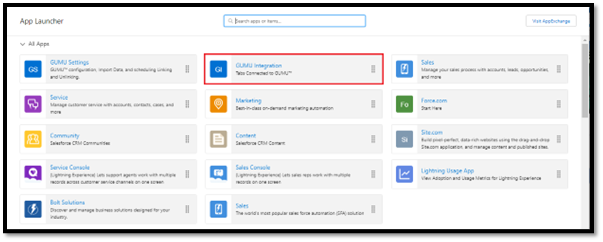
Learn more about the GUMU™ Integration app in our GUMU™ Integration User Guide.