Our Quick Start Implementation Package is perfect for companies who want to immediately see the gains of an integrated system and how that impacts the efficiency and productivity of staff members. This package includes all the initial technical work, system training, as well as some key features that focus on user adoption.
Out-of-the-box Standard Package
Be up-and-running quickly
Integrated with Sage 100, 300, X3, or Intacct
Best-in-class Outlook Integration
My CRM Manager’s Quick Start Implementation Package
Objectives
Our focus during the Quick Start Implementation is to get your staff comfortable navigating around the application and using the fundamental features of:
Profiling companies and people
Using Sage CRM in conjunction with Outlook and getting comfortable recording our interactions
In the course of the Quick Start, you will gain an immediate return on your investment and have a clear idea of what you might do with Sage CRM next
Inclusions
My CRM Manager will complete the technical setup of the system and then work with your staff to configure the system and get users comfortable with the fundamentals of Sage CRM. This means using it to profile companies and people as well as recording interactions.
6 weekly sessions with a Senior Sage CRM Project Manager who will guide you through the transition
Homework assignments!
Controlled success
Recommendations for optimizing and scaling
Suggested next steps
Note – these training sessions are designed for your CRM steering committee (3-5 users) who will ultimately define how the system is going to be used by end-users
Schedule for 6 System Training & Configuration Sessions
Week 1
Kick Off (Navigating CRM)
After Sage CRM has been installed and the setup (above) has been completed, we will schedule our kick-off call. In this first call, we will focus on accessing and navigating around Sage CRM.
Note – all our projects have defined point persons (we say CRM Administrator) to help facilitate training and support issues. We will discuss the role in our first group meeting.
Week 2
Profile Review
A fundamental setup task is to create fields in your Sage CRM instance that make perfect sense for your particular organization. We will talk through this, demonstrate various examples and ask users to give thought to what will make sense to them.
Week 3
Setting Up Profiles
In this session, we will be collecting feedback from the group on what fields/options are required and start putting them into the system.
Week 4
Accelerator Training
Accelerator is the Advanced integration with MS Outlook. Using it makes getting data into and out of Sage CRM very easy. Accelerator is very powerful with deep functionality.
Week 5
Review of Advanced Features
In this session we continue with Accelerator and, IF users have been doing their homework, then at this point we can go deeper into understanding some of Sage CRM’s more advanced functionality. This can include: process automation, working with the accounting integration, opportunity management, reports and dashboards, etc.
Week 6
Deciding Next Steps
This marks the conclusion of the Quick Start. Users will now have a good handle on the fundamentals of Sage CRM and be in a good position to decide on what should happen next.
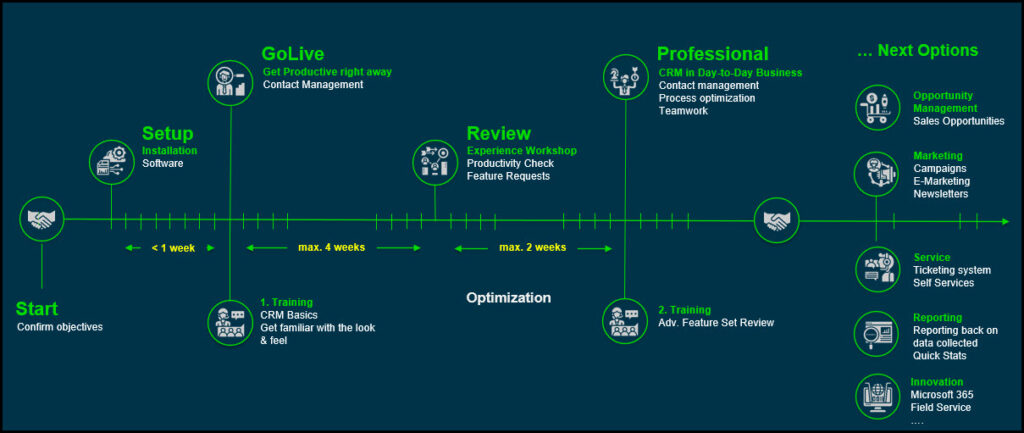
Timeline: Quick Start Implementation Package
The Quick Start focuses on the basics of profiling information and managing communications. We will create fields, and modify screens and lists. And we will provide training related to using Sage CRM’s MS Outlook integration (Accelerator). In the second half of the Quick Start, we will review Sage CRM’s advanced feature set, however, configuring any of Sage CRM’s advanced features is out-of-scope for the Quick Start.
Quick Start: Exclusions
Modifications to the integration
We will set up the integration, but any changes to the integration specific to your company are out-of-scope.
Data Migration
We will be connecting your accounting system to Sage CRM (if applicable) and importing customer records. However, importing data from any secondary sources is out-of-scope as not all customers require this and because requirements can vary. If bringing in additional data is required, this will be done on a T&M basis.
Conditional Formatting
We include creating new or updating existing fields to screens and lists as part of the Quick Start setup (sessions 2 & 3). However, we do not include conditional formatting of these fields. For example, if field X = A, then make field Y required. The options for applying conditions to fields are almost limitless, but out-of-scope of the Quick Start Implementation Package.
Advanced Features
The possibilities with Sage CRM are almost infinite. But the Quick Start is intended to focus on the fundamentals. In the second half of the Quick Start, we will review Sage CRM’s advanced feature set, however, configuring any of Sage CRM’s advanced features is out-of-scope for the Quick Start. Examples of advanced features include: Process automation (aka workflow), new screens, or applying scripts to screens.
Ongoing Support
The training sessions must be completed within 60-days. This 60-day period begins once our technicians have completed the technical setup of the system, and your project manager lets you know that the system is ready.
Quick Start: Costs?
Our Quick Start Implementation Package is priced at $8,750. This excludes software licensing. Check out our pricing to see how much Sage CRM would cost for your organization.
Quick Start Testimonials & Reviews
Very friendly staff and unparalleled Sage customizations. Thanks for all the hard work in getting my Sage 100 to fit my needs that much better. Life savers!
Ian McFarlane,Owner
Working with My CRM Manager was a breath of fresh air. They are professional, communicative, and very passionate about CRMs helping their clients. Thanks for the great setup and looking forward to customizing Sage CRM to fit our organization’s needs.
The Dollar A Sock Company
Incredibly easy to work with, My CRM Manager helped us wrangle our Sage instance to help both sales people and fulfillment. The ongoing customizations ensure that Sage continues to fit our needs. Thanks!
Easy Shipping Restrictions,Shopify Apps & Development
Ian McFarlane,Owner
Easy Shipping Restrictions,Shopify Apps & Development